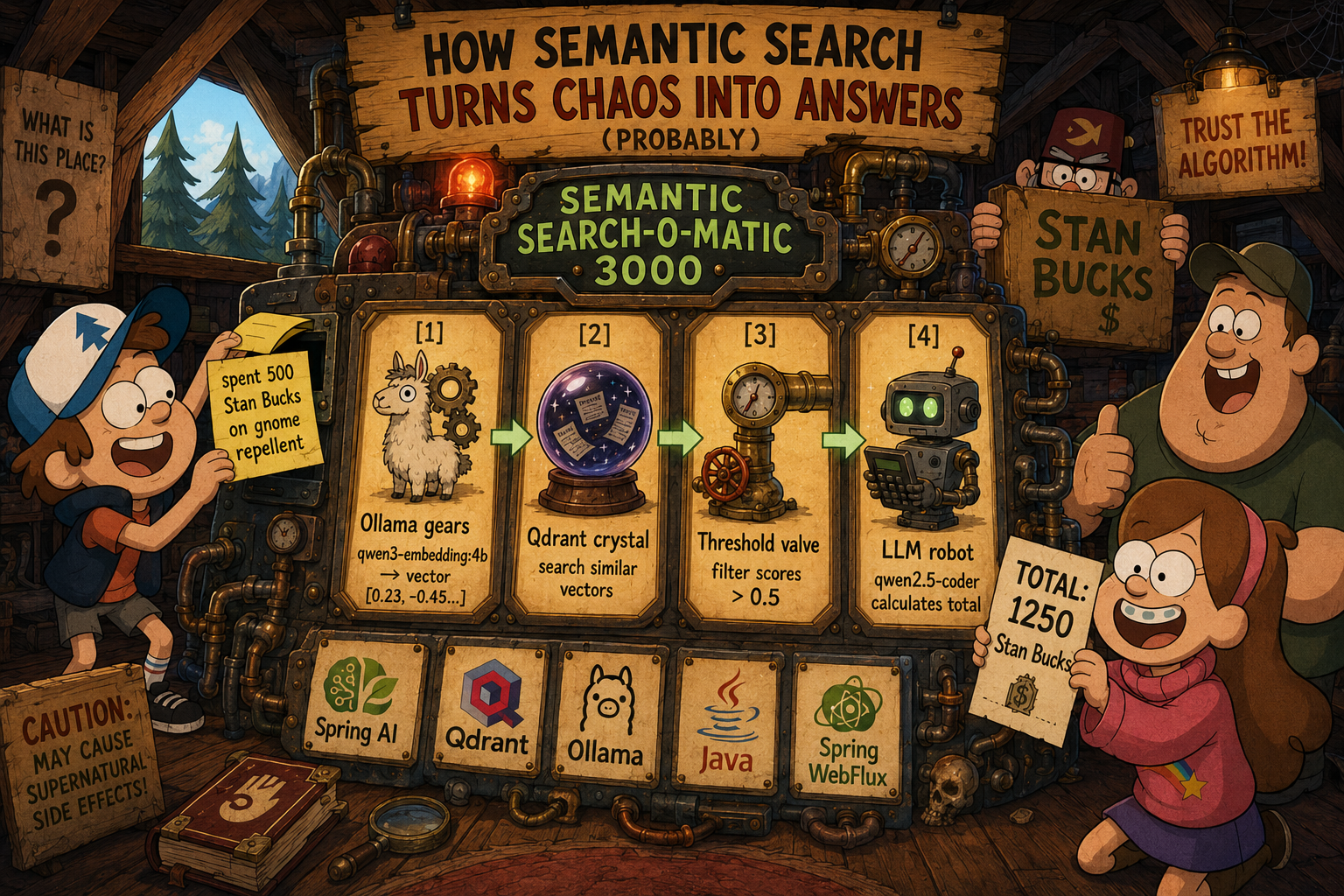
Today we will help Dipper manage his notes and search through the vector database Qdrant. Embeddings will be evaluated using local Ollama with model qwen3-embedding:4b.
A Spring Boot WebFlux application will enable creating new notes and later finding relevant entries for a given request.
How semantic search works#
Some LLMs process prompts, while others help generate embeddings.
An embedding is just a vector — a sequence of numbers evaluated based on your input (note content in our example)
Consider that we have a word — we can evaluate embeddings with the following request:
1
2
3
4
5
6
| curl http://localhost:11434/api/embeddings -d '{
"model": "qwen3-embedding:4b",
"prompt": "Money"
}'
{"embedding":[0.00006774807116016746,0.0102694071829319,0.0445568785071373,-0.03628170117735863,-0.00006878106796648353,0.05543242022395134,0.061089541763067245,-0.0319434218108654,0.03612612187862396,0.004248240031301975,-0.05339532345533371,-0.020881647244095802,0.004204519093036652,-0.09664184600114822,0.03344804048538208,-0.005402477458119392,-0.0031058574095368385,-0.028406444936990738,0.021006926894187927,-0.006013193167746067,-0.02208755351603031,0.05295052006840706,0.07071677595376968,-0.01712462306022644,0.00577147863805294,-0.02784077636897564,-0.030619341880083084,-0.06376510113477707,-0.004841937683522701,0.017675025388598442,0.025581058114767075,-0.015383075922727585,0.05703539028763771,-0.011210239492356777,0.006604902911931276,-0.013171998783946037,0.014134218916296959,-0.009579027071595192,0.015368842519819736,-0.016864117234945297 ...]}
|
As we can see, the response contains a vector. If we have 2 vectors (for different inputs) we can calculate the distance between them. The semantic similarity between inputs increases as the distance between their embedding vectors decreases.
We can use the following snippet to calculate distances:
 1
 2
 3
 4
 5
 6
 7
 8
 9
10
11
12
13
14
15
16
17
18
19
20
21
22
23
24
25
26
27
28
29
30
31
32
33
| import numpy as np
import json
import sys
import requests
def get_embedding(text, model="qwen3-embedding:4b"):
response = requests.post(
"http://localhost:11434/api/embeddings",
json={"model": model, "prompt": text}
)
return np.array(response.json()["embedding"])
def cosine_similarity(v1, v2):
return np.dot(v1, v2) / (np.linalg.norm(v1) * np.linalg.norm(v2))
def euclidean_distance(v1, v2):
return np.linalg.norm(v1 - v2)
def manhattan_distance(v1, v2):
return np.sum(np.abs(v1 - v2))
words = ['king', 'queen', 'ping']
target = 'king'
vectors = {word: get_embedding(word) for word in words}
for word in words:
v1 = vectors[target]
v2 = vectors[word]
print(f"\n{target} vs {word}:")
print(f" cosine: {cosine_similarity(v1, v2):.4f}")
print(f" euclid: {euclidean_distance(v1, v2):.4f}")
print(f" manhat: {manhattan_distance(v1, v2):.4f}")
|
 1
 2
 3
 4
 5
 6
 7
 8
 9
10
11
12
13
14
15
16
| python3 dist.py
king vs king:
cosine: 1.0000
euclid: 0.0000
manhat: 0.0000
king vs queen:
cosine: 0.8107
euclid: 0.6153
manhat: 24.6933
king vs ping:
cosine: 0.5500
euclid: 0.9487
manhat: 37.7823
|
As demonstrated, the embeddings capture semantic meaning rather than surface-level word similarity. Vectors that are closer in space correspond to semantically related concepts, regardless of how the words are spelled.
So the goal of semantic search is to answer a question, not just find word patterns in text.
Qdrant for Handling and Searching Data#
Qdrant is a high-performance, open-source vector database engine built from the ground up for AI and machine learning applications. Written in Rust, it’s designed to be blazingly fast and rock-solid reliable, capable of storing and searching through billions of vector embeddings — those rich numerical representations that neural networks generate from text, images, audio, and other data.
Qdrant is added as a service in the docker-compose file: https://github.com/alexey-yurganov/jroom36-notes/blob/main/docker-compose.yml
 1
 2
 3
 4
 5
 6
 7
 8
 9
10
11
12
13
14
15
16
17
18
| services:
qdrant:
image: qdrant/qdrant:latest
container_name: jroom36-qdrant
ports:
- "6333:6333"
- "6334:6334"
volumes:
- qdrant_data:/qdrant/storage
- qdrant_snapshots:/qdrant/snapshots
environment:
- QDRANT__SERVICE__GRPC_PORT=6334
restart: unless-stopped
healthcheck:
test: ["CMD", "curl", "-f", "http://localhost:6333/health"]
interval: 10s
timeout: 5s
retries: 5
|
Qdrant supports 2 ports:
- port 6333 for REST API communication
- port 6334 for gRPC communication
The size of the embedding vector depends on the LLM. In this article we use qwen3-embedding:4b model with a vector size of 2560.
- gRPC makes sense as it allows more efficient handling of large requests compared to REST. Consider comparing Embedding Dimensions for Different LLMs
Ollama Models (Local)#
| Model | Embedding Dimension | Notes |
|---|
| qwen3-embedding:8b | 4096 (MRL 32+) | Highest dimension among Ollama models. Supports Matryoshka Representation Learning (MRL). |
| qwen3-embedding:4b | 2560 (MRL 32+) | Good balance of performance and quality. |
| qwen3-embedding:0.6b | 1024 | Efficient smaller model. |
| mxbai-embed-large | 1024 | Popular choice for many tasks. |
| nomic-embed-text | 768 | Very popular, balanced speed and quality. |
| embeddinggemma | 768 | Google’s embedding model. |
| snowflake-arctic-embed | 768 | Optimized for retrieval tasks. |
| snowflake-arctic-embed:33m | 384 | Extremely lightweight. |
| all-minilm | 384 | Fastest and lightest for prototyping. |
How to Check Dimension in Ollama#
1
2
3
4
5
6
| curl http://localhost:11434/api/embeddings -d '{
"model": "qwen3-embedding:4b",
"prompt": "test"
}' | jq '.embedding | length'
2560
|
List of actively tested LLMs can be found at https://huggingface.co/spaces/mteb/leaderboard
Spring Boot WebFlux Application#
I selected WebFlux just to play around — it allows writing code which should not block the app in term of resources (threads) - if app handles a lot of requests.
To enable WebFlux, you need to update application.yml with the following configuration:
1
2
3
4
5
| spring:
...
main:
web-application-type: reactive
...
|
and add spring-boot-starter-webflux to dependencies (pom.xml)
1
2
3
4
5
6
| <dependencies>
<dependency>
<groupId>org.springframework.boot</groupId>
<artifactId>spring-boot-starter-webflux</artifactId>
</dependency>
...
|
After that Spring will switch Web Server from embedded Tomcat to Netty and you will be able to use Mono and Flux to handle reactivity of your application.
As an example to motivate thinking about reactivity, consider that we implemented ReactiveEmbeddingService.java using reactive WebClient, a blocking version with a REST Client supports only 100–300 requests per second(RPS) while the version implemented with reactive WebClient can handle up to 10k RPS up to 10k RPS
We have controller ReactiveNoteController which allows handling basic operations with notes:
| Method | Path | Description |
|---|
| POST | /api/notes | Create a note (body: {"content": "..."}) |
| GET | /api/notes/{id} | Get note by ID |
| GET | /api/notes | List all notes (?page=0&size=20) |
| PUT | /api/notes/{id} | Update a note |
| DELETE | /api/notes/{id} | Delete a note |
| POST | /api/notes/bulk | Bulk create notes |
| GET | /api/notes/search?q=...&limit=10 | Semantic search |
| GET | /api/notes/search/threshold?q=...&threshold=0.5&limit=10 | Search with score threshold |
| GET | /api/notes/search/stream?q=...&limit=10 | Streaming search (SSE) |
There are 2 basic scenarios: creating a new note and searching notes.
Create new Note#
- ReactiveNoteController calls ReactiveNoteService to create Note
- ReactiveNoteService calls Ollama to get an embedding (vector) for note content. (ReactiveEmbeddingService::generateEmbedding)
- After that ReactiveNoteService `creates a NoteDocument and fills it with the previously evaluated embedding.
- Then it saves it using the Spring Repository - ReactiveQdrantNoteRepository.
- ReactiveQdrantNoteRepository is responsible for handling CRUDL for Qdrant db. It builds json body for request.
When saving points to Qdrant via the REST API, you need to specify three key fields in the JSON request to the /collections/{collection_name}/points endpoint.
 1
 2
 3
 4
 5
 6
 7
 8
 9
10
11
| {
"points": [
{
"id": 1,
"vector": [0.9, 0.1, 0.1],
"payload": {
"content": "test note",
}
}
]
}
|
Search Notes#
For search scenario please see
- ReactiveNoteController::search
- ReactiveNoteController::searchWithThreshold
The second endpoint allows filtering results based on score that is assigned to specific Note.
- ReactiveNoteController will call ReactiveNoteService::search
- Embedding vector will be calculated based on query (using Ollama embeddings API)
- ReactiveQdrantNoteRepository will handle communication to Qdrant db to pass the embedding forward
`The following body is expected at the Qdrant endpoint “/collections/{collection}/points/search”
 1
 2
 3
 4
 5
 6
 7
 8
 9
10
11
12
13
14
15
16
| {
"vector": [0.2, 0.1, 0.9, 0.7],
"filter": {
"must": [
{
"key": "created_at",
"range": {
"gte": "2024-01-01T00:00:00Z",
"lte": "2024-12-31T23:59:59Z"
}
}
]
},
"limit": 10,
"with_payload": true
}
|
The Synchronous Limitation of Spring AI for Embeddings & Qdrant#
Spring AI offers an excellent abstraction layer and is highly recommended for use in embedding, tooling, chat, and other AI pipelines. However, a significant limitation exists for developers building fully reactive applications.
As confirmed by the official Spring AI documentation and GitHub issue #2828, the EmbeddingModel interface defines a contract that returns results synchronously. This requires the use of Mono.fromCallable(...).subscribeOn(Schedulers.boundedElastic()) to prevent blocking the non-blocking WebFlux threads.
Mono.fromCallable(...).subscribeOn(Schedulers.boundedElastic()) is a common pattern to handle blocking calls and offload them from the main event loop. However, it still has significantly worse performance — roughly 300 RPS vs 10k RPS in a fully reactive pipeline.
Similarly, the QdrantVectorStore operates synchronously, calling the embedding model and then blocking on the Qdrant gRPC client, which also necessitates thread offloading.
Therefore, for a truly reactive application, the only alternative is to bypass Spring AI’s starter and create your own fully asynchronous implementation using Spring’s WebClient. This involves manually crafting HTTP requests and parsing JSON responses, as demonstrated in the following examples (some models could be reused from Spring AI, but this is a TODO):
Does this limitation affect the current demo? No, because the primary bottleneck for this specific setup is the processing time of Ollama embedding requests. However, if you have sufficient resources and require handling upwards of 300 requests per second on the EmbeddingModel, you should consider moving to the true async version with WebClient. Alternatively, you can change your approach: schedule the request but process it asynchronously in the background.
Demo#
https://github.com/alexey-yurganov/jroom36-notes/tree/feature/manual-webclient-calls
Let’s build and start the application and test how it works.
 1
 2
 3
 4
 5
 6
 7
 8
 9
10
11
12
13
14
15
16
17
18
19
20
21
22
23
24
25
26
27
28
29
30
31
32
33
34
35
36
37
38
39
40
41
| make up
❯ make up
Checking Java...
✓ Java 25 is active
Setting up jroom36-notes...
✓ Setup complete for jroom36-notes
Starting Qdrant...
[+] Running 4/4
✔ Network jroom36-notes_default Created 0.0s
✔ Volume "jroom36-qdrant-data" Created 0.0s
✔ Volume "jroom36-qdrant-snapshots" Created 0.0s
✔ Container jroom36-qdrant Started 0.2s
Waiting for Qdrant to be ready...
-n .
✓ Qdrant is ready and running
Initializing Qdrant collection for jroom36-notes...
Using vector dimension: 2560 (from model qwen3-embedding:4b)
✓ Collection 'notes' created with size 2560
Creating index on created_at field...
✓ Index on 'created_at' created
Building jroom36-notes...
...
. ____ _ __ _ _
/\\ / ___'_ __ _ _(_)_ __ __ _ \ \ \ \
( ( )\___ | '_ | '_| | '_ \/ _` | \ \ \ \
\\/ ___)| |_)| | | | | || (_| | ) ) ) )
' |____| .__|_| |_|_| |_\__, | / / / /
=========|_|==============|___/=/_/_/_/
:: Spring Boot :: (v4.0.5)
2026-06-16T16:52:28.793+07:00 INFO 5075 --- [jroom36-notes] [ main] i.g.j.notes.Jroom36NotesApplication : Starting Jroom36NotesApplication using Java 25.0.2 with PID 5075 (/Users/lx2/code/jroom36-notes/target/classes started by lx2 in /Users/lx2/code/jroom36-notes)
2026-06-16T16:52:28.794+07:00 DEBUG 5075 --- [jroom36-notes] [ main] i.g.j.notes.Jroom36NotesApplication : Running with Spring Boot v4.0.5, Spring v7.0.6
2026-06-16T16:52:28.794+07:00 INFO 5075 --- [jroom36-notes] [ main] i.g.j.notes.Jroom36NotesApplication : The following 1 profile is active: "default"
2026-06-16T16:52:29.380+07:00 INFO 5075 --- [jroom36-notes] [ main] o.s.b.a.e.web.EndpointLinksResolver : Exposing 1 endpoint beneath base path '/actuator'
2026-06-16T16:52:29.542+07:00 INFO 5075 --- [jroom36-notes] [ main] o.s.boot.reactor.netty.NettyWebServer : Netty started on port 8080 (http)
2026-06-16T16:52:29.545+07:00 INFO 5075 --- [jroom36-notes] [ main] i.g.j.notes.Jroom36NotesApplication : Started Jroom36NotesApplication in 0.926 seconds (process running for 1.068)
|
- Docker Compose with Qdrant and Spring Boot WebFlux application compiled and deployed
- We can load some test data:
 1
 2
 3
 4
 5
 6
 7
 8
 9
10
11
12
13
14
15
16
17
18
19
20
21
22
23
24
25
26
27
28
29
30
31
32
33
34
35
36
37
38
39
40
41
42
43
44
45
46
47
48
49
50
51
52
53
54
55
56
57
58
59
60
61
62
63
64
65
66
67
68
69
70
71
72
73
74
75
76
77
78
79
80
81
82
83
84
85
| ❯ make load-test-data
Loading test data into jroom36-notes...
[
{
"content": "watched Oppenheimer - mind blowing cinematography",
"createdAt": "2026-06-16T09:55:26.871817Z",
"id": "f2da5c69-4e6f-4a4a-b252-ed102c029422"
},
{
"content": "idea for weekend: visit new art exhibition downtown",
"createdAt": "2026-06-16T09:55:26.871001Z",
"id": "493ff0b8-3b06-455f-aa03-f61877536cc6"
},
{
"content": "meeting with team at 3pm about new project",
"createdAt": "2026-06-16T09:55:26.869952Z",
"id": "f9a79b57-1c22-4509-a93a-a642665b2719"
},
{
"content": "call friend on Sunday - her birthday",
"createdAt": "2026-06-16T09:55:26.871430Z",
"id": "43aa7b21-e73c-473f-88f8-a1c95b8b59c7"
},
{
"content": "finished reading Dune by Frank Herbert - amazing world building",
"createdAt": "2026-06-16T09:55:26.266407Z",
"id": "d7806d77-dcb8-4be5-90b4-72604dfbe47b"
},
{
"content": "todo: buy groceries tomorrow morning",
"createdAt": "2026-06-16T09:55:29.550378Z",
"id": "9cb639e1-dc1d-4ee4-a4ad-c428229f5da1"
},
{
"content": "learned about vector databases today - very interesting",
"createdAt": "2026-06-16T09:55:29.598539Z",
"id": "22ad0983-dddc-4d75-96e0-c0573341b92c"
},
{
"content": "planning trip to mountains next month",
"createdAt": "2026-06-16T09:55:29.713808Z",
"id": "155e84c3-31f8-4e11-bb3b-2da0c76e26d5"
},
{
"content": "remember to send report by Friday",
"createdAt": "2026-06-16T09:55:29.827056Z",
"id": "06e09a34-4171-4d32-8141-19eb14869699"
},
{
"content": "spent about $5.70 on lunch",
"createdAt": "2026-06-16T09:55:29.936698Z",
"id": "2911ce3c-7921-406e-8100-e42979479247"
},
{
"content": "paid about $4.00 for coffee",
"createdAt": "2026-06-16T09:55:30.040795Z",
"id": "986905ff-7e54-4e95-9683-1231ddb37deb"
},
{
"content": "bought hat for about $4.70",
"createdAt": "2026-06-16T09:55:30.160026Z",
"id": "90502b28-752f-45e8-9eb2-7149ceefccf1"
},
{
"content": "purchased milk about $2.05",
"createdAt": "2026-06-16T09:55:30.259369Z",
"id": "d31bf0b7-13c6-4acd-95ea-62f4a7fad888"
},
{
"content": "cost me about $9.10 for cinema",
"createdAt": "2026-06-16T09:55:30.364005Z",
"id": "34f84370-7b09-4d1c-8827-709d67135be6"
},
{
"content": "wasted about $13.65 on dinner",
"createdAt": "2026-06-16T09:55:30.479290Z",
"id": "bd6e52fa-a987-409b-b347-1d706b92919f"
},
{
"content": "used about $6.80 for taxi",
"createdAt": "2026-06-16T09:55:30.599015Z",
"id": "13551ca4-c0dc-404f-b00b-fc358bed113a"
}
]
✓ Test data loaded
|
- As you can see, we have some notes from Dipper about money spent. Let’s ask jroom36-notes to search for such entries using semantic search:
1
| curl --location 'http://localhost:8080/api/notes/search/threshold?q=%22spent%20dollars%22&threshold=0.5'
|
 1
 2
 3
 4
 5
 6
 7
 8
 9
10
11
12
13
14
15
16
17
18
19
20
21
22
23
24
25
26
27
28
29
30
31
32
33
34
35
36
37
38
39
40
41
42
43
44
45
46
47
48
49
50
51
52
53
54
55
56
57
58
| [
{
"note": {
"content": "wasted about $13.65 on dinner",
"createdAt": "2026-06-16T09:55:30.479290Z",
"id": "bd6e52fa-a987-409b-b347-1d706b92919f"
},
"score": 0.6860653
},
{
"note": {
"content": "spent about $5.70 on lunch",
"createdAt": "2026-06-16T09:55:29.936698Z",
"id": "2911ce3c-7921-406e-8100-e42979479247"
},
"score": 0.64409065
},
{
"note": {
"content": "paid about $4.00 for coffee",
"createdAt": "2026-06-16T09:55:30.040795Z",
"id": "986905ff-7e54-4e95-9683-1231ddb37deb"
},
"score": 0.63457835
},
{
"note": {
"content": "cost me about $9.10 for cinema",
"createdAt": "2026-06-16T09:55:30.364005Z",
"id": "34f84370-7b09-4d1c-8827-709d67135be6"
},
"score": 0.60324347
},
{
"note": {
"content": "purchased milk about $2.05",
"createdAt": "2026-06-16T09:55:30.259369Z",
"id": "d31bf0b7-13c6-4acd-95ea-62f4a7fad888"
},
"score": 0.602462
},
{
"note": {
"content": "bought hat for about $4.70",
"createdAt": "2026-06-16T09:55:30.160026Z",
"id": "90502b28-752f-45e8-9eb2-7149ceefccf1"
},
"score": 0.5919056
},
{
"note": {
"content": "used about $6.80 for taxi",
"createdAt": "2026-06-16T09:55:30.599015Z",
"id": "13551ca4-c0dc-404f-b00b-fc358bed113a"
},
"score": 0.5416342
}
]
|
As you can see, Qdrant responded with information related to spent dollars
And a second attempt with ’expenses money’ query
1
| curl --location 'http://localhost:8080/api/notes/search/threshold?q=%22expenses%20money%22&threshold=0.5'
|
 1
 2
 3
 4
 5
 6
 7
 8
 9
10
11
12
13
14
15
16
17
18
19
20
21
22
23
24
25
26
27
28
29
30
31
32
33
34
35
36
37
38
39
40
41
42
43
44
45
46
47
48
49
50
51
52
53
54
55
56
57
58
59
60
61
62
63
64
65
66
67
68
69
70
71
72
73
74
75
76
77
78
79
80
81
82
| [
{
"note": {
"content": "wasted about $13.65 on dinner",
"createdAt": "2026-06-16T09:55:30.479290Z",
"id": "bd6e52fa-a987-409b-b347-1d706b92919f"
},
"score": 0.6759753
},
{
"note": {
"content": "paid about $4.00 for coffee",
"createdAt": "2026-06-16T09:55:30.040795Z",
"id": "986905ff-7e54-4e95-9683-1231ddb37deb"
},
"score": 0.6399065
},
{
"note": {
"content": "spent about $5.70 on lunch",
"createdAt": "2026-06-16T09:55:29.936698Z",
"id": "2911ce3c-7921-406e-8100-e42979479247"
},
"score": 0.6300858
},
{
"note": {
"content": "purchased milk about $2.05",
"createdAt": "2026-06-16T09:55:30.259369Z",
"id": "d31bf0b7-13c6-4acd-95ea-62f4a7fad888"
},
"score": 0.6250319
},
{
"note": {
"content": "bought hat for about $4.70",
"createdAt": "2026-06-16T09:55:30.160026Z",
"id": "90502b28-752f-45e8-9eb2-7149ceefccf1"
},
"score": 0.6194464
},
{
"note": {
"content": "cost me about $9.10 for cinema",
"createdAt": "2026-06-16T09:55:30.364005Z",
"id": "34f84370-7b09-4d1c-8827-709d67135be6"
},
"score": 0.6193081
},
{
"note": {
"content": "todo: buy groceries tomorrow morning",
"createdAt": "2026-06-16T09:55:29.550378Z",
"id": "9cb639e1-dc1d-4ee4-a4ad-c428229f5da1"
},
"score": 0.5934824
},
{
"note": {
"content": "used about $6.80 for taxi",
"createdAt": "2026-06-16T09:55:30.599015Z",
"id": "13551ca4-c0dc-404f-b00b-fc358bed113a"
},
"score": 0.5848515
},
{
"note": {
"content": "planning trip to mountains next month",
"createdAt": "2026-06-16T09:55:29.713808Z",
"id": "155e84c3-31f8-4e11-bb3b-2da0c76e26d5"
},
"score": 0.5563802
},
{
"note": {
"content": "call friend on Sunday - her birthday",
"createdAt": "2026-06-16T09:55:26.871430Z",
"id": "43aa7b21-e73c-473f-88f8-a1c95b8b59c7"
},
"score": 0.53600526
}
]
|
Some extra notes were added without direct mentions of spent money, but based on content like “birthday” or “planning trip,” they could imply spending.
Semantic search works. Using more powerful LLMs for embeddings, you can get more precise results. Also, the approach with filtering by some indexed field can help reduce the search scope. And we still have relational approach on hand — hybrid search should cover most cases: some parts controlled by known structures and others localized by semantic vectors.